
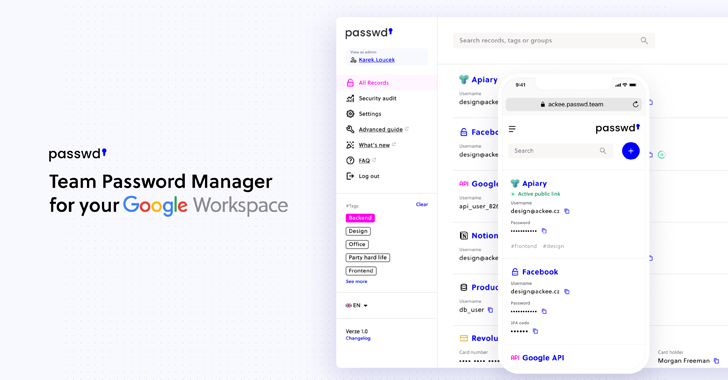
Passwd is designed specifically for organizations operating within Google Workspace. Rather than competing as a general consumer password manager, its purpose is narrow, and business-focused: secure credential storage, controlled sharing, and seamless Workspace integration. The platform emphasizes practicality over feature overload, aiming to provide a reliable system for teams that already rely on Google’s tools.
Encryption and data protection are the basic building blocks of Passwd. Every credential, file, or sensitive asset gets encrypted with AES-256, an extremely secure encryption standard that is widely recognized. Encryption happens before storage, keeping data protected throughout its lifecycle.
Passwd is based on a zero-knowledge architecture; only the users, not Passwd, are able to access decrypted data. It does not have any visibility of the stored passwords or secrets.
The structure reflects an enterprise mindset:
Security assurance is further supported by SOC 2 and GDPR readiness, through documentation and controls for businesses that need to adhere to regulated compliance standards. Along with encryption and zero-knowledge design, these certifications reinforce the security posture of the platform.
Audit logs and access tracking provide visibility into who has viewed, shared, or changed credentials in the system. This is helpful in a number of ways when it comes to compliance, internal audits, and security reviews.
From a reliability perspective, Passwd has minimal downtime. Though Google updates caused disruptions, they have only been short-lived. There have not been any data breaches to date.
Where most password managers extend across multiple ecosystems, Passwd stays firmly within Google’s. The platform connects directly to Google Workspace for identity management, making onboarding and administration easier.
Because authentication is done via Google OAuth, users sign in with their existing Google accounts, with no new master passwords, credentials, or login systems to maintain. This reduces credential sprawl and eliminates separate password databases.
For teams used to Gmail, Drive, Docs, or Google Admin Console, the setup feels intuitively familiar. Deployments take mere minutes rather than requiring IT restructuring.
This focus also creates clarity about the intended environment in which Passwd will operate: Passwd works only inside the Google Workspace ecosystem and cannot be used with external identity providers.
Passwd includes Google SSO support, allowing for a passwordless login experience. The service also provides audit logging, which gives administrators insight into who has accessed credentials and when. Reports indicate it scales effectively for several hundred employees, and its pricing model eliminates additional fees once a company has more than 301 users, making it appealing to larger teams.
When activated, Passwd turns into a shared storage system in which groups can securely organize:
Sharing can be temporary or permanent, by individuals or groups. Permissions control a user’s level of access to a record: whether they can view it, edit it, or manage it. Activity tracking enables a team to understand how its credentials are being accessed and by whom.
Role-based access, sharing links, and detailed audit trails support common workplace scenarios, new employee onboarding, transitions between departments, or restricted administrative access.
Passwd’s Premium plans include unlimited records and users, designed to scale with an organization as it grows. The plan tier determines the features available, allowing businesses to adopt the level that fits their workflows.

Passwd provides wide device compatibility with a lightweight footprint:
Browser extensions help autofill records and credential capture without requiring large desktop applications. This cross-platform consistency allows users to transition easily from device to device without changing how they interact with stored data.
Passwd contains the essential password-management utilities:
The interface is free of complicated add-ons, favoring a clean, straightforward layout: search, filtering, and record editing are easily located and used.
The pricing of Passwd is designed for organizational usage, rather than individual licensing.
This puts Passwd in the position of being an entry-level enterprise product, but without the need for enterprise-level pricing.
Passwd maintains a 4.7-star rating across the third-party review platforms, including Trustpilot and G2.
Feedback often points out that:
Smaller teams often mention that the free tier provides enough functionality for centralized storage and secure sharing, while larger organizations use Passwd for its onboarding and role transitions.
Based on its structure and feature set, Passwd aligns most naturally with organizations that:
Its design intentionally prioritizes Workspace compatibility over platform versatility.
A walkthrough of Passwd shows a password manager featuring predictability, efficiency, and organizational alignment rather than feature saturation. Its role is clear: provide strong encryption, controlled collaboration, compliance-ready visibility, and seamless Google authentication.
For teams already living inside Google Workspace, Passwd becomes an extension of the workflows that are already in place, not another tool to manage, and handles shared credentials, enforces access governance, and protects sensitive information in a safe, structured manner.

Our mission is to educate our customer base, build capacity in every country we operate in and make cyber security affordable to all